
Bridge to permanent calculator in Excel.
See whether a value-add deal pays off its bridge loan at the refinance, how much of your cash comes back, and whether the bridge term is long enough to get there.
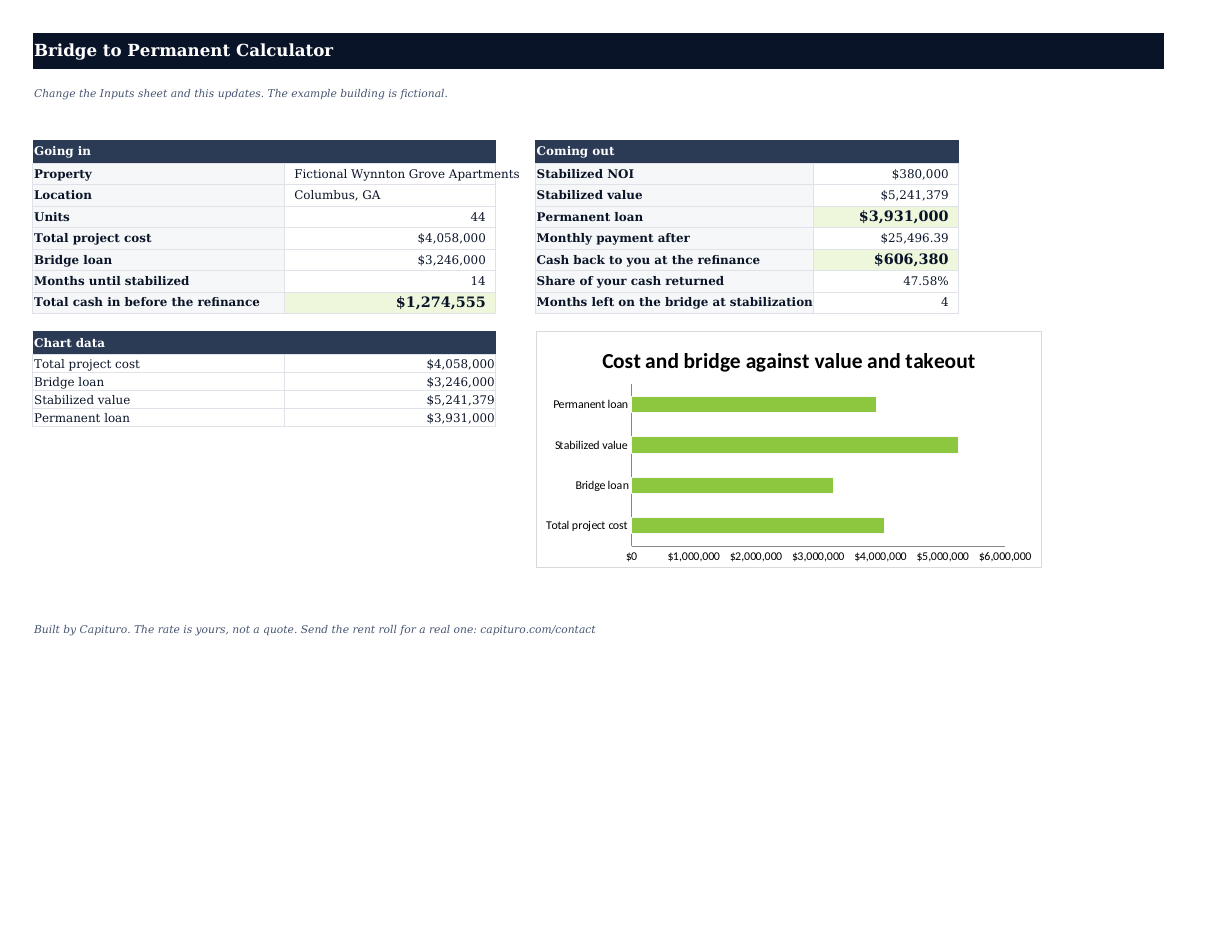
The second loan decides whether the first one worked.
A value-add deal is two loans. The bridge is sized on what you pay and what you spend. The permanent loan is sized on what the building earns once it is full. If the second number does not cover the first, the difference comes out of your pocket at the refinance, and no amount of renovation changes that.
This workbook runs the whole sequence, from purchase to takeout. The example building is fictional.
- See how much cash the deal needs before the refinance, including the interest carry.
- Find the permanent loan the stabilized building supports, by value and by cash flow.
- Know at closing whether the takeout covers the bridge, or whether you bring money to the refinance.
- Check the bridge term against the months to stabilize, with time left for the permanent loan to close.
- Watch what a half point of cap rate does to the value, the loan, and your cash back.
- Share one clean Summary page with a partner before making the offer.
Four sheets. One clear answer.
Pale-yellow cells are yours to fill. Everything else updates on its own. Opens in Excel, Google Sheets, or Numbers.
From purchase price to cash back in four steps.
- Inputs sheet
Enter the purchase and the work
Price, renovation budget with contingency, closing costs, and how many months the renovation and the lease-up will each take. Lease-up ends when occupancy reaches the permanent lender's minimum, usually around 90%.
- Inputs sheet
Enter the bridge loan
Loan as a share of total cost, the interest-only rate, points, and the term in months. The rate is yours to fill. The example uses 10.5% so the formulas work, but it is not a quote.
- Inputs sheet
Enter the stabilized building
Post-renovation rents for every unit, other income, vacancy, expenses at the post-purchase tax bill, reserves, and the cap rate similar stabilized buildings sell at. The appraiser sets the real one.
- Takeout sheet
Enter the permanent loan and read the answer
Rate, amortization, maximum LTV, minimum DSCR, and closing costs. The At the refinance section gives cash back to you, or cash in.
Cost sets the bridge. NOI sets the takeout.
Total project cost is price plus renovation plus closing. The bridge is that cost times the loan-to-cost you entered. Interest runs on the full bridge at the interest-only rate for the months of renovation plus lease-up.
Total cost times loan-to-cost.
Cash in at closing is cost less the bridge plus points. Interest carried until stabilization is added on top, whether you pay it monthly or from a reserve.
The lower of value and cash flow.
Value is NOI divided by the cap rate. The permanent loan is the lower of value times maximum LTV and the loan the NOI supports at the minimum DSCR, rounded down to the nearest $1,000.
Cash back is the permanent loan less the bridge payoff, less closing costs.
Negative means you bring the difference. The share of your cash returned is cash back divided by everything you put in before the refinance.
A fictional 44 unit in Columbus.
These are the numbers already loaded in the workbook, so you can open it and follow along.
- Units
- 44
- Purchase price
- $2,900,000
- Renovation budget
- $1,100,000
- Purchase closing costs
- 2%
- Renovation + lease-up
- 8 + 6 months
- Bridge
- 80% of cost, 10.5% IO
- Points and term
- 2 pts, 18 months
- Stabilized rent
- $660,000 + $20,000
- Expenses and reserves
- $255,000 + $250/unit
- Cap rate tested
- 7.25%
- Permanent loan tested
- 6.75%, 30 yr, 75% LTV
$668,175 stays in the building
Month 14
The building stabilizes in month 14, with 4 months left on the 18 month bridge.
- Total cost
- $4,058,000
- Bridge loan
- $3,246,000
- Cash in at closing
- $876,920
- Interest carried, 14 mo
- $397,635
- Total cash in
- $1,274,555
- Stabilized NOI
- $380,000
- Stabilized value
- $5,241,379
- Permanent loan
- $3,931,000
- DSCR after
- 1.24x
- Months left on the bridge
- 4
| Cap rate | Stabilized value | Permanent loan | Cash back |
|---|---|---|---|
| 6.25% | $6,080,000 | $4,068,000 | $740,640 |
| 6.75% | $5,629,630 | $4,068,000 | $740,640 |
| 7.25%Your cap | $5,241,379 | $3,931,000 | $606,380 |
| 7.75% | $4,903,226 | $3,677,000 | $357,460 |
| 8.25% | $4,606,061 | $3,454,000 | $138,920 |
This is a deal that works and does not return all the equity, which is what most value-add deals actually look like.
$668,175 stays in the building. Four months of term left is enough for a permanent loan that usually takes 60 to 90 days, if the application is ready when the building stabilizes, and not much more. Alternatives can close in 35 days, or quicker, if the term is shorter than that. At a 7.75% cap the cash back drops to $357,460. The cap rate is the input to argue about.
Cash back tells you whether the exit works.
Look for "Cash back to you (or in)" and "Months left on the bridge at stabilization" on the Takeout sheet.
The takeout does not cover the bridge.
The stabilized value, times the maximum LTV, is less than what you borrowed to buy and renovate. You bring the difference at the refinance.
The term is the risk, not the numbers.
The better permanent loans usually take 60 to 90 days from a complete application. With two months left, you are looking at an extension, or an alternative that can close in 35 days or quicker.
If the permanent loan is limited by cash flow instead of value, the fix is rents or rate, not the appraisal. The Takeout sheet says which one is binding.
Common errors and fixes.
Cash back is negative.
Check value over total cost. Under about 115%, the takeout rarely clears the bridge at 75% LTV. The deal needs a lower price, a cheaper renovation, or higher stabilized rents.
Months left on the bridge is zero or negative.
The renovation and lease-up take longer than the term. Plan on an extension and price it, or find a longer bridge.
Total cash in looks too high.
The workbook charges interest on the full loan from day one. If your bridge funds the renovation in draws, the real number is lower, though not by half.
What it covers, and what it does not.
- One property, one bridge drawn in full at closing, one permanent loan.
- Interest carried through renovation and lease-up, up to 60 months on the timeline.
- Permanent loan sized by value and by cash flow.
Buyers use the Takeout sheet before making an offer, to see whether the price leaves room for the refinance to work. Owners mid-renovation use the Timeline sheet to check how much term they have left against how far the lease-up has to go.
The cap rate table is the page to open when a broker's pro forma assumes a stabilized value that the neighborhood's sales do not.
When the numbers hold up, send the purchase contract, the renovation budget, and the post-renovation rent roll. Capituro will review both loans with rates that reflect the property and the sponsor.
Your working copy.
Review the inputs, formulas, and limits before adapting it. Keep the original and validate formulas after every change.
- Direct download
- No account
- Editable file
- Opens in Sheets and Numbers
Where this leads next
Bridge Financing
For buildings bought vacant, under renovation, or still leasing up, with a refinance planned once occupancy is in.
Open10+ Unit Apartment Refinance
Refinance larger apartment buildings on the property's income.
OpenApartment Cash-Out Refinance Calculator
Size a cash-out by value and by cash flow, and see which one is binding.
OpenApartment DSCR Calculator
Test whether a loan clears the lender's minimum coverage.
OpenFrequently asked
Why is the interest carried on the full loan from day one?+
What does value over total cost mean?+
Where do the rates come from?+
How much time do I need left on the bridge?+
Does this replace a lender's sizing on either loan?+
Send the deal for a real sizing.
We will review both loans with rates that reflect the property and the sponsor, rather than the rates on the Inputs sheet.